> ## Documentation Index
> Fetch the complete documentation index at: https://docs.figr.design/llms.txt
> Use this file to discover all available pages before exploring further.
# Credits & Usage
> Understand Figr's credit system, monitor your usage, and optimize your subscription for maximum value.
## How credits work
Every action in Figr uses credits. **Think of one credit as one hour of a designer's time.** Simple tasks use less. Complex ones use more.
| **Action in Figr** | **What it does for you** | **Typical credits used**\* | **What affects credits** |
| :------------------------- | :---------------------------------------------------------------------- | :------------------------- | :------------------------------------------- |
| Brainstorm & explore ideas | Generate directions, concepts, and problem‑framing from your context | 0.1–0.5 per exploration | Length of brief, number of ideas requested |
| Define PRDs & flows | Turn research into PRDs, user flows, and edge‑case maps | 0.5–1 per flow or PRD | Flow complexity, number of scenarios covered |
| Generate designs | Create screens and variations based on your PRD, flows, and constraints | 1–1.5 per screen | Number of screens, number of variants |
| Refine & polish designs | Make precise edits, states, and micro‑improvements to existing designs | 0.1-0.5 per edit | Amount of content edited in one go |
| Review & critique designs | Get structured UX / product feedback on screens or flows | 0.5–1 per review | Number of screens, depth of critique |
| Other AI assists | Smaller tasks (naming, copy tweaks, summaries, etc.) | 0.1–0.5 per request | Prompt length, extra context attached |
The math is simple. Bigger, more complex work costs more credits.
## Checking your balance
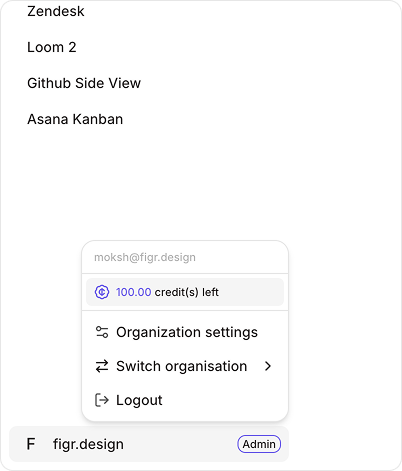
You'll see your remaining credits after each query. **No surprises.**
Want to check anytime? Look at the bottom of your sidebar navigation. Click your email and you'll see your credit balance right there.
 ## Team subscriptions
Teams share one pool of credits. **Unlimited seats.** Everyone on your team draws from the same credit pool. No need to track individual usage or worry about seat limits.
Add 5 people or 50. Zero extra cost.
## Credit rollover
Unused credits? They roll over to next month.
**But there's a cap.** You can roll over up to your monthly allocation amount. So if you get 100 credits per month, you can bank a maximum of 100 credits.
## What if I run out
Hit your limit mid-month? Upgrade to a higher plan anytime. You'll get access to more credits immediately.
Check pricing and credit allocations
Credit consumption is dynamic. The numbers above are estimates -actual usage depends on the complexity of what you're building.
***
Learn how to add team members, assign roles, and manage collaborative workflows effectively.
[Team Management →](/account/team-management)
## Team subscriptions
Teams share one pool of credits. **Unlimited seats.** Everyone on your team draws from the same credit pool. No need to track individual usage or worry about seat limits.
Add 5 people or 50. Zero extra cost.
## Credit rollover
Unused credits? They roll over to next month.
**But there's a cap.** You can roll over up to your monthly allocation amount. So if you get 100 credits per month, you can bank a maximum of 100 credits.
## What if I run out
Hit your limit mid-month? Upgrade to a higher plan anytime. You'll get access to more credits immediately.
Check pricing and credit allocations
Credit consumption is dynamic. The numbers above are estimates -actual usage depends on the complexity of what you're building.
***
Learn how to add team members, assign roles, and manage collaborative workflows effectively.
[Team Management →](/account/team-management)