> ## Documentation Index
> Fetch the complete documentation index at: https://docs.figr.design/llms.txt
> Use this file to discover all available pages before exploring further.
# Organize Canvas Work
> Keep a crowded project scannable with sticky notes, comments, sections, and connector lines.
As a project fills up with screenshots, references, UX reviews, flows, PRDs, and prototypes, it gets harder to scan. Sticky notes, comments, sections, and connector lines keep it organized.
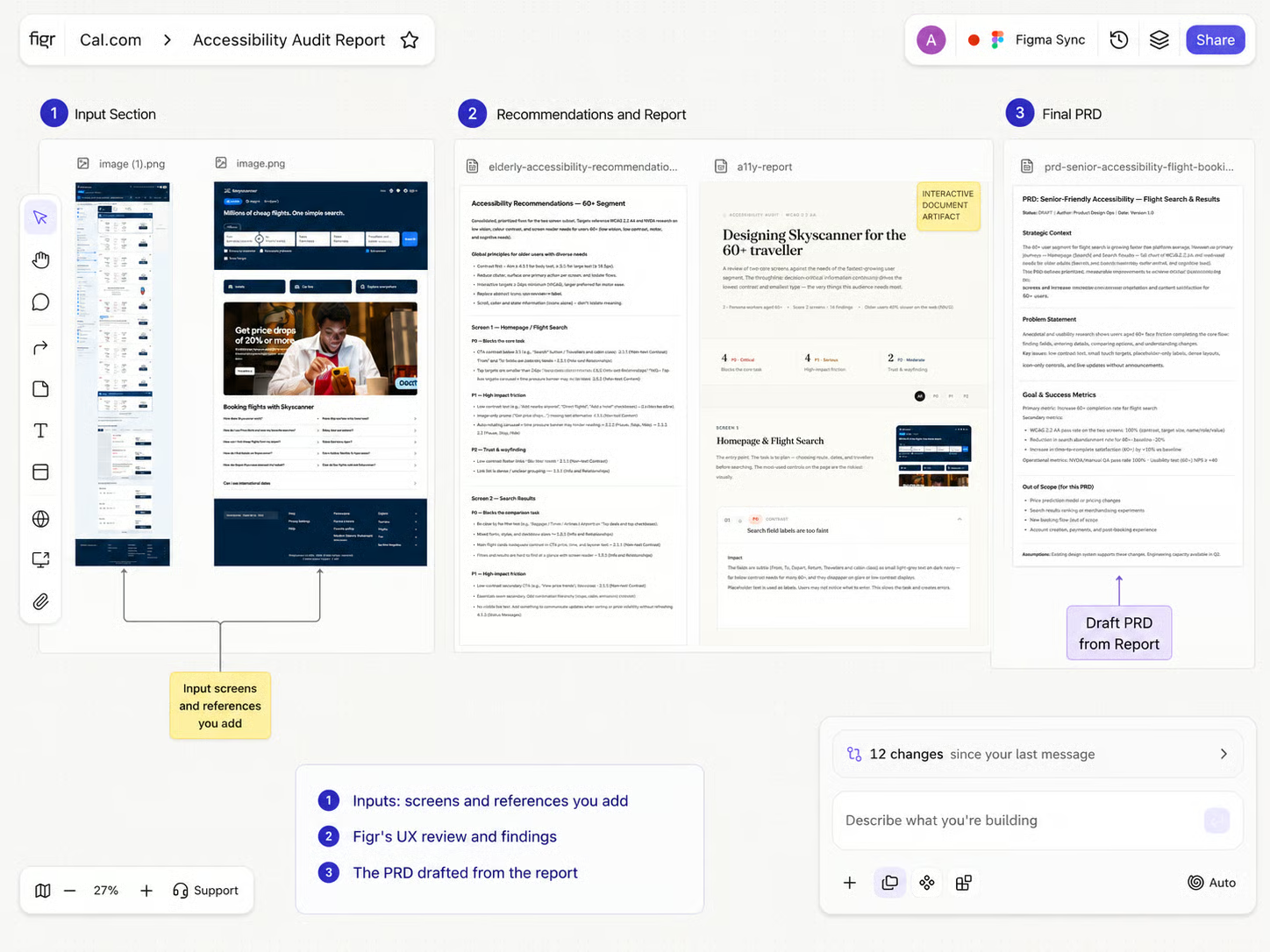
 ## Sticky notes
Quick context beside the work: "Need PM input," "Check empty state," "Final direction," "Needs edge cases," "Engineering constraint," or "Use this reference pattern."
## Comments
Feedback tied to a specific item on the Canvas:
* Ask a PM to confirm a requirement
* Leave design feedback on a screen
* Ask engineering to check feasibility
* Mark something for founder review
* Add handoff clarification before export
## Sections
Group related work into named stages: Research inputs, UX review, User flow, Design explorations, Final direction, Ready for review, Ready for export.
## Connector lines
Show relationships between items, such as a PRD connected to its prototype, or a user flow connected to the screens it produced.
## Organize a crowded canvas
Drop a sticky note beside an item to capture quick context or a decision.
Attach a comment to a specific item when feedback belongs to that artifact.
Select related items and group them into a named section so the stage is clear at a glance.
Link artifacts to each others with connectors and give Figr relational context
## Related
The visual workspace, end to end.
What you can do with a selected item.
Find and restore earlier versions.
## Sticky notes
Quick context beside the work: "Need PM input," "Check empty state," "Final direction," "Needs edge cases," "Engineering constraint," or "Use this reference pattern."
## Comments
Feedback tied to a specific item on the Canvas:
* Ask a PM to confirm a requirement
* Leave design feedback on a screen
* Ask engineering to check feasibility
* Mark something for founder review
* Add handoff clarification before export
## Sections
Group related work into named stages: Research inputs, UX review, User flow, Design explorations, Final direction, Ready for review, Ready for export.
## Connector lines
Show relationships between items, such as a PRD connected to its prototype, or a user flow connected to the screens it produced.
## Organize a crowded canvas
Drop a sticky note beside an item to capture quick context or a decision.
Attach a comment to a specific item when feedback belongs to that artifact.
Select related items and group them into a named section so the stage is clear at a glance.
Link artifacts to each others with connectors and give Figr relational context
## Related
The visual workspace, end to end.
What you can do with a selected item.
Find and restore earlier versions.