> ## Documentation Index
> Fetch the complete documentation index at: https://docs.figr.design/llms.txt
> Use this file to discover all available pages before exploring further.
# Brainstorm & Thinking
> Explore ideas before committing to designs. Generate concepts, surface edge cases, think through problems. Product thinking before pixel pushing.
## What Brainstorm Does
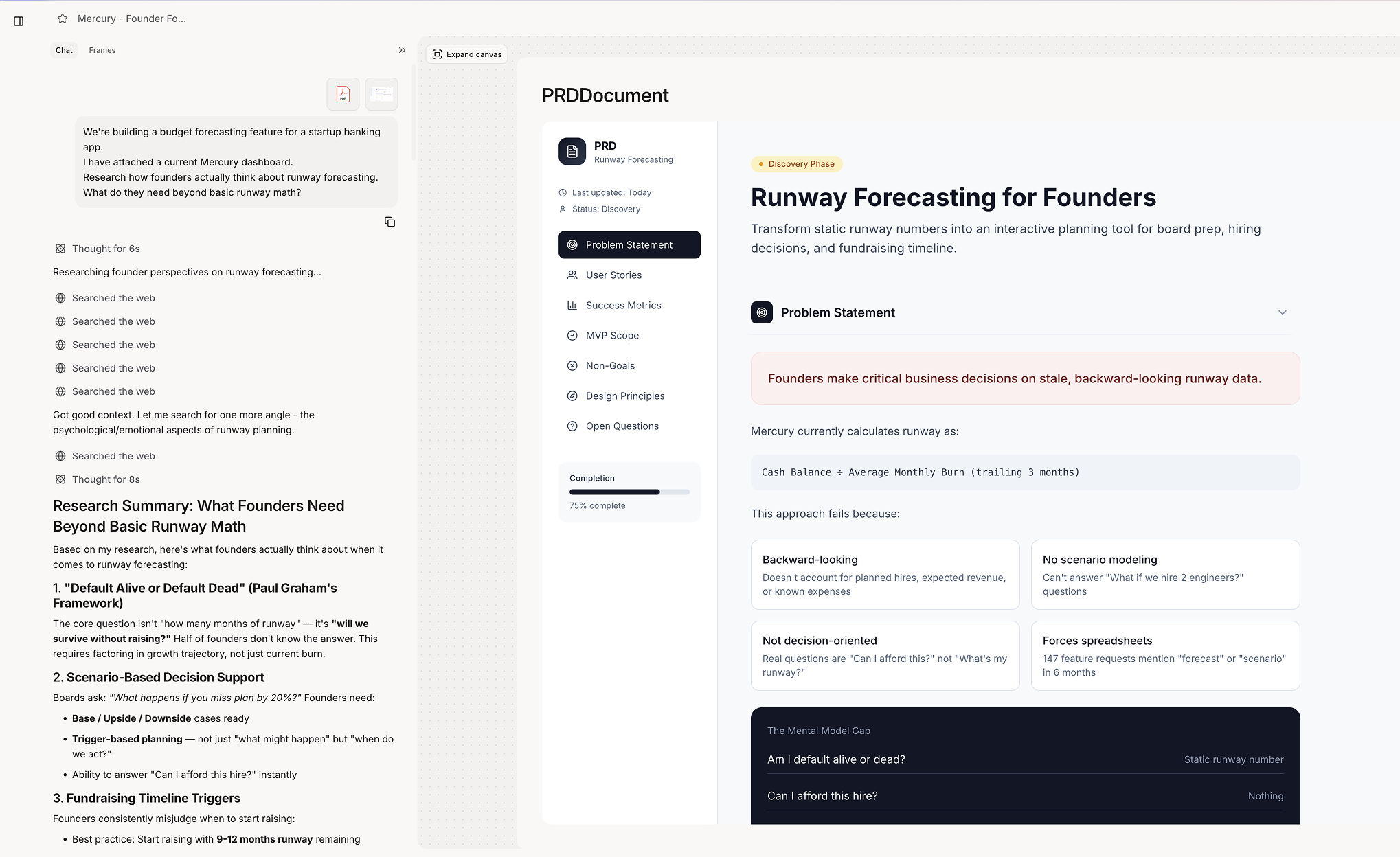
Brainstorm helps you think through problems before jumping to solutions. It generates ideas, explores approaches, identifies considerations, and surfaces what you might miss. Brainstorm provides:
* PRDs and documentation
* Multiple concept directions
* Feature ideas and variations
* Edge case identification
* Pros/cons analysis
* Strategic recommendations
 ## When Figr Uses Brainstorm
Figr engages brainstorming when you:
* Explore open-ended problems
* Ask for ideas or options
* Want to think through a feature
* Need to identify considerations
* Request multiple approaches
```text theme={null}
"How should we handle..."
"What are different ways to..."
"Help me think through..."
"What should we consider for..."
"Give me ideas for..."
```
## [](#brainstorm-outputs) What Brainstorm Produces
Multiple directions: "Three different approaches to user onboarding:
* Progressive disclosure wizard
* Interactive tutorial overlay
* Contextual tips on first use"
What you might miss: "Consider these scenarios:
* User with no data yet
* User hitting plan limits
* Multiple users editing simultaneously
* Session timeout during long forms"
* **Pros and cons:** "Modal confirmation: ✓ Clear user intent ✓ Prevents accidents ✗ Interrupts flow ✗ Extra click required"
## From Brainstorm to Design
Brainstorm naturally flows into design.
```text theme={null}
Workflow:
1. "Help me think through a settings page" → Brainstorm
2. Review ideas and edge cases
3. "Design option 2 - the tabbed approach" → Prototype
4. Iterate based on brainstorm insights
```
***
## [](#best-results)Getting Best Results
* **Less effective:** "Design a modal for confirmation"
* **More effective:** "Users accidentally delete things. How should we handle confirmation?"
* **Rich prompts:** "We're a B2B tool for enterprise teams. Help me think through role-based permissions. Current pain point: admins can't delegate."
* **Go deeper:** "What about edge case #3 - tell me more" "How would approach 2 work on mobile?" "What are the risks of the progressive approach?"
## When Figr Uses Brainstorm
Figr engages brainstorming when you:
* Explore open-ended problems
* Ask for ideas or options
* Want to think through a feature
* Need to identify considerations
* Request multiple approaches
```text theme={null}
"How should we handle..."
"What are different ways to..."
"Help me think through..."
"What should we consider for..."
"Give me ideas for..."
```
## [](#brainstorm-outputs) What Brainstorm Produces
Multiple directions: "Three different approaches to user onboarding:
* Progressive disclosure wizard
* Interactive tutorial overlay
* Contextual tips on first use"
What you might miss: "Consider these scenarios:
* User with no data yet
* User hitting plan limits
* Multiple users editing simultaneously
* Session timeout during long forms"
* **Pros and cons:** "Modal confirmation: ✓ Clear user intent ✓ Prevents accidents ✗ Interrupts flow ✗ Extra click required"
## From Brainstorm to Design
Brainstorm naturally flows into design.
```text theme={null}
Workflow:
1. "Help me think through a settings page" → Brainstorm
2. Review ideas and edge cases
3. "Design option 2 - the tabbed approach" → Prototype
4. Iterate based on brainstorm insights
```
***
## [](#best-results)Getting Best Results
* **Less effective:** "Design a modal for confirmation"
* **More effective:** "Users accidentally delete things. How should we handle confirmation?"
* **Rich prompts:** "We're a B2B tool for enterprise teams. Help me think through role-based permissions. Current pain point: admins can't delegate."
* **Go deeper:** "What about edge case #3 - tell me more" "How would approach 2 work on mobile?" "What are the risks of the progressive approach?"