> ## Documentation Index
> Fetch the complete documentation index at: https://docs.figr.design/llms.txt
> Use this file to discover all available pages before exploring further.
# User Flow
> Visualize journeys, document paths, identify gaps. See the complete picture before designing individual screens.
## What Map User Flow Does
Map User Flow creates visual representations of user journeys, process flows, and system interactions. It documents paths, identifies decision points, and surfaces missing states. Map User Flow produces:
* User journey diagrams
* Process flowcharts
* Decision trees
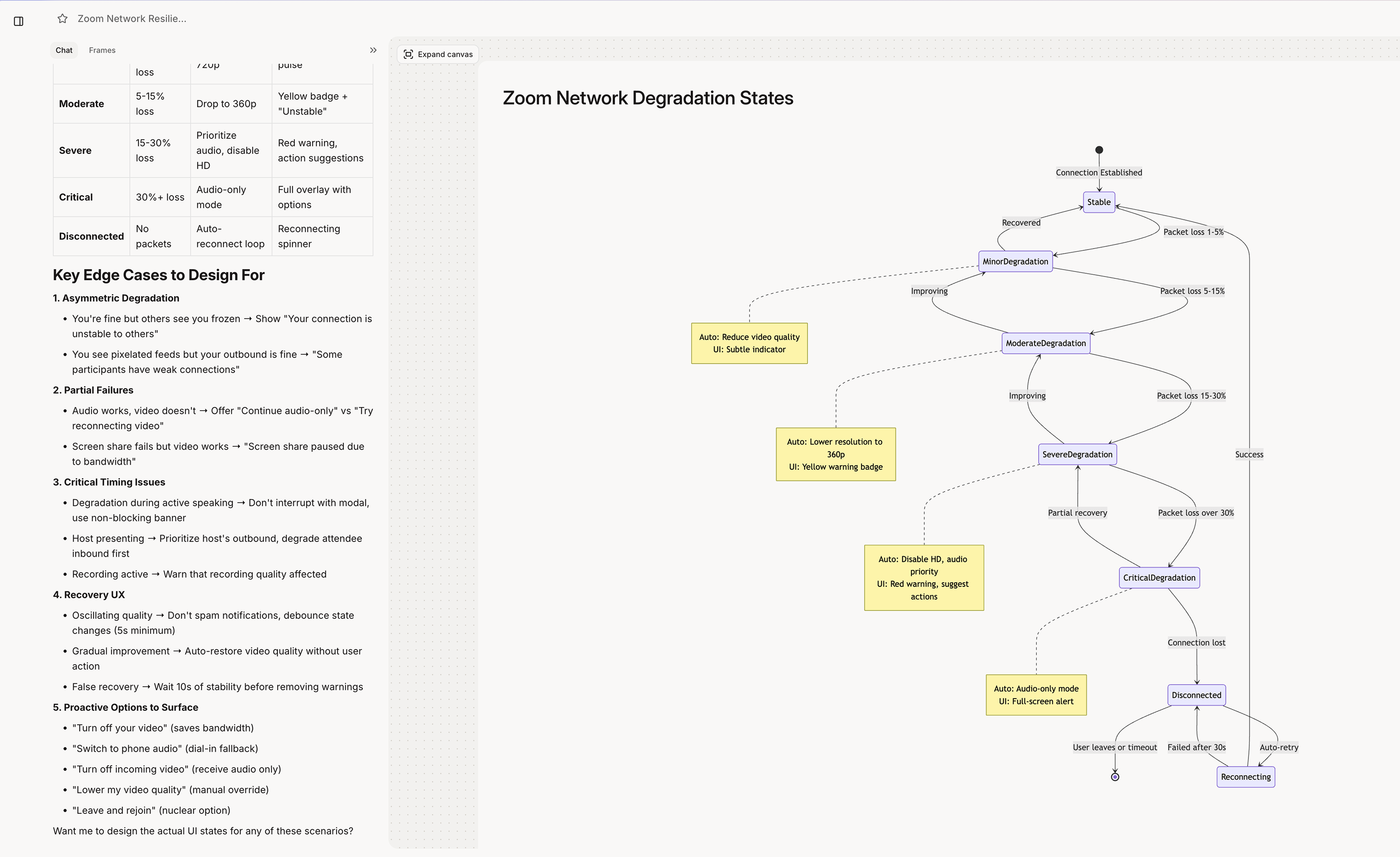
* State diagrams
* Information architecture maps
 ## [](#when-figr-uses-map-flow) When Figr Uses Map User Flow
Figr engages flow mapping when you:
* Ask to visualize a journey
* Need to document a process
* Want to see all paths in a flow
* Request a diagram or map
* Ask about user journeys
```text theme={null}
"Map the checkout flow"
"Show me the user journey for..."
"Create a flowchart for..."
"What are all the paths through...?"
"Diagram the onboarding process"
```
## [](#flow-types) Types of Flow Maps
End-to-end user experience. Journey map includes:
* Touchpoints and interactions
* User emotions and pain points
* Opportunities for improvement
* Cross-channel transitions
Step-by-step process documentation. Flowchart includes:
* Sequential steps
* Decision points
* Branching paths
* Start and end states
* Error handling paths
All possible states and transitions. State diagram includes:
* Every possible state
* Transitions between states
* Trigger conditions
* Edge case states
Content and navigation structure. IA map includes:
* Page hierarchy
* Navigation relationships
* Content groupings
* Cross-linking patterns
## Getting Best Results
* \*\*Clear boundaries: \*\*"Map the flow from clicking 'Create Project' to seeing the new project dashboard"
* **Complete coverage**: "Include error states and edge cases" "What happens if the user goes back?" "Show the timeout scenario"
* **Right granularity:** "High-level overview of the signup journey" vs. "Detailed flowchart of form validation logic"
## [](#when-figr-uses-map-flow) When Figr Uses Map User Flow
Figr engages flow mapping when you:
* Ask to visualize a journey
* Need to document a process
* Want to see all paths in a flow
* Request a diagram or map
* Ask about user journeys
```text theme={null}
"Map the checkout flow"
"Show me the user journey for..."
"Create a flowchart for..."
"What are all the paths through...?"
"Diagram the onboarding process"
```
## [](#flow-types) Types of Flow Maps
End-to-end user experience. Journey map includes:
* Touchpoints and interactions
* User emotions and pain points
* Opportunities for improvement
* Cross-channel transitions
Step-by-step process documentation. Flowchart includes:
* Sequential steps
* Decision points
* Branching paths
* Start and end states
* Error handling paths
All possible states and transitions. State diagram includes:
* Every possible state
* Transitions between states
* Trigger conditions
* Edge case states
Content and navigation structure. IA map includes:
* Page hierarchy
* Navigation relationships
* Content groupings
* Cross-linking patterns
## Getting Best Results
* \*\*Clear boundaries: \*\*"Map the flow from clicking 'Create Project' to seeing the new project dashboard"
* **Complete coverage**: "Include error states and edge cases" "What happens if the user goes back?" "Show the timeout scenario"
* **Right granularity:** "High-level overview of the signup journey" vs. "Detailed flowchart of form validation logic"